
The TechRing isn’t charging
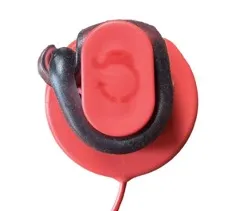
Check the ring is wrapped clockwise and lined up with the center of the charger. Twisting it slightly usually fixes it.
- TechRing
- Check the direction. Wrap the ring around the charger the way the logo on top of the charger shows (clockwise).
- Line it up. Twist the ring slightly so it sits in the center of the charger. If it’s turned too far one way or the other, it may not charge.
- Watch the light. It flashes red when charging starts and turns green when it’s full.
Still no light after trying this? Contact us and we’ll help.
Was this helpful?
Thanks for letting us know.
Sorry about that. Tell us what was missing and we will help. Contact us